These days I have Claude Code running on just about every computing device I own. Well, not my watch, but I suppose that will come soon. Two personal laptops, a corporate AVD for a client project, and a MacBook where I do my iOS development. Super common to have half a dozen sessions going at once, each one off doing its own thing while I try to herd the cats.
That is a fine problem to have, up until I try to keep track of it all. Which of these six terminals is still working? Which one finished ten minutes ago and has been sitting there waiting on me the whole time? The only way to find out was to alt-tab through every window and read them one by one. Which is a ridiculous approach when one is spread across four machines.
(Yes I am well aware I am not the first person to encounter this problem!)
Unlike the ABC-to-MIDI fiasco of the early days (where I essential reinvented an existing utility), I am wise enough now that before I built anything I went looking to see how other people were solving it. And sheesh, are they solving. Some busy folks out there, creating gazillions of dashboards, notifiers, frobnosticators, menu-bar widgets, and clever hook scripts. And a few of them seem seriously good! So I could have, and perhaps should have, adopted one and moved on.
But I chose to use this as a learning exercise and had Claude help me build my own from scratch. Hey, I gotta get my money's worth out of my Claude Code subscription, make it do all the hard stuff! That actually worked really well.
Why it ended up Windows-first
The awkward part is where all my pain actually came from. Claude Code's terminal interface owns the whole window. It's constantly redrawing itself, and that means there's no clean way for a session to say "hey, I'm done" through the terminal itself. Any color or marker you try to paint gets stomped by the next redraw a fraction of a second later.
On Windows, using Windows Terminal, it took an annoying amount of craziness to work around. What finally worked: Claude Code's hooks drop a tiny signal file every time a prompt goes out and every time a run completes, and a small always-on-top panel (old school Windows Forms app!) just watches those files and reflects the state from outside the terminal entirely.
So this is a Windows-only tool, please do not judge. Sure, some of the underlying ideas would port to a Mac setup just fine - the hook-and-signal-file approach isn't Windows-specific. But most of what I had to fight was the Windows Terminal side of things, so that's what most of the code addresses.
What it actually does
The result is by design (or lack thereof) utilitarian. It's one skinny window that floats on top of everything: a single row per active Claude Code session. Green means Claude is working. Red means it's done and waiting on you. Click a row and it jumps you straight to that session's terminal window. That's basically the whole thing.
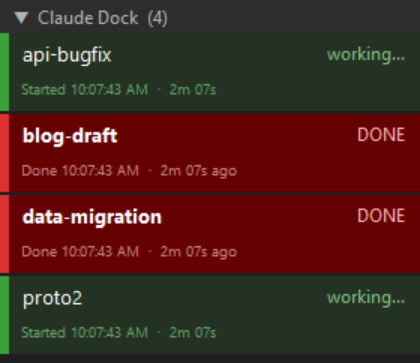
The piece I use the most is the multi-machine support. Sessions running on other boxes report in, either directly over the local network, or through a tiny relay for the ones stuck behind a corporate firewall, so that all four machines' worth of Claude sessions show up in one clean dock, with a label telling me which machine each row belongs to. At a glance I can see that the AVD finished, one laptop is still grinding, and the Mac is waiting on input, without touching any of them.
I liked it enough to publish it
I realize this is a very niche use case, but who knows, someone might benefit from the idea or code, so that's why I am putting it out there. Perhaps it may be useful to anyone else wrestling with Claude across more machines than they can watch at once.
It's on GitHub, MIT-licensed, with setup docs: github.com/rodj/claude-dock. If you try it, I'd love to hear how it goes!